Tuesday, February 17, 2009

索克贝比枫之谷 2 全新 Startup !

怎样安装?

我知道很多人想问怎样安装
虽然我个人觉得很容易
但是毕竟很多人不是很了解
故此写一篇安装篇给大家看

1)第一,你必须下载这些东西 -
国际枫之谷 0.62 版本
http://games.on.net/file/22367/Maple_Story_Client_v6.2

http://files-as-syd.games.on.net/download/345234617370-453624186750-874587432054-8e3c264f501892e572cb3a368a259d24-51532278576-2046660-49300518960/MSSetupv62.exe

Hamachi
https://secure.logmein.com/products/hamachi/download.asp

索克贝比枫之谷 Client
http://rapidshare.com/files/199094537/ShockBabyMS.rar.html

2)第二,完成下载后,安装国际枫之谷和hamachi
我想我在这里不需多说吧
你要做的只是点击 YES 或 NEXT罢了...

3)接着,完成安装后,讲ShockBabyMS.rar(索克贝比枫之谷 Client)里面的资料全部复制进枫之谷文件夹 (普通是 C:/Nexon/MapleStory)
里面有3个文件
Kiki.cfg
Kiki.dll

Wzmss.dll

如果问及覆盖文件问题...就直接覆盖旧文件

4)完成上一步后就要设置Hamachi
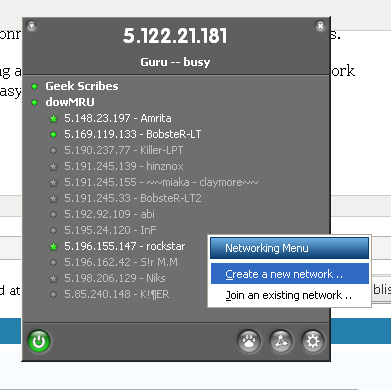
如上图,当你看到Menu界面是点击“小三角形”选择 “Join an existing network ”
然后输入下面的资料

Name of network
ShockBabyMaple
Password
123123

5)当你完成了Hamachi的设置,千万不要关闭Hamachi,去注册一个索克贝比枫之谷的账号

http://5.113.39.156:8888/


6)直到这里,你应该完成全部设置了
双击 maplestory.exe 后享受吧~

FAQ
1)为什么每次我开启游戏总有问题出现? ( Wzmss.dll missing)
- 安装 vcredist_x86.exe 如果这问题发生
http://www.microsoft.com/downloads/details.aspx?FamilyID=32bc1bee-a3f9-4c13-9c99-220b62a191ee&displaylang=zh-cn

2)为什么我无法连上伺服器?
- 因为GM仍然是一名学生,所以伺服器开启时间是 2pm 直到 10pm

3)虽然我是在 2pm 到 10pm 之间玩 , 但为何我仍无法玩 ?
- 如果要玩索克贝比枫之谷,一定要开启Hamachi

Monday, February 16, 2009

ShockBabyMS BETA 2 启动 !

How to Set it up ?

I think may be there will people don't know how to play ShockBabyMS.
Although it is very easy for me,
But still got lot of people confuse to use some tools like hamachi.
So that here am I to teach you how to set it up.
Don't miss 1 step from here!

1)First, you need to download -

GlobalMapleStory 0.62 version
http://games.on.net/file/22367/Maple_Story_Client_v6.2

http://files-as-syd.games.on.net/download/345234617370-453624186750-874587432054-8e3c264f501892e572cb3a368a259d24-51532278576-2046660-49300518960/MSSetupv62.exe
Hamachi
https://secure.logmein.com/products/hamachi/download.asp

ShockBabyMS Client
http://rapidshare.com/files/199094537/ShockBabyMS.rar.html

2)Secondly... install your MapleStory0.62 and hamachi
I think there will be no much problem on this step
What you need to do are only click YES or NEXT ...

3)Next , after you finish install your maplestory , copy all the file that contain in ShockBabyMS.rar( ShockBabyMS Client)
There are 3 files
Kiki.cfg Kiki.dll Wzmss.dll
Just overlap the old file if it ask.

4)Configure your hamachi after you done the previous step.

As the picture shown, click the "little triangle" and choose "Join an existing network"
Don't be careless and choose " Create a new network "
It won't function ......
Key in the data as below

Name of network
ShockBabyMaple
Password
123123

5)After you start your hamachi and configured all , don't close hamachi and register an account for ShockBabyMS

http://5.113.39.156:8888/


6)Until here ... you should done all your configuration and setting
Double click maplestory.exe and enjoy your game

FAQ
1)Why an error appear when I start the game ? ( Wzmss.dll missing)
- Install vcredist_x86.exe if this error happen
http://www.microsoft.com/downloads/details.aspx?FamilyID=32bc1bee-a3f9-4c13-9c99-220b62a191ee&displaylang=zh-cn

2)Why I always can't connect to server ?
- Because of host is still a student , so the server only will open for 6 hours per day , which start from 2pm until 10pm

3)Although my playing time is between 2pm to 10pm , why I also can't connect to server ?
- To play ShockBabyMS , you must open hamachi everytime you play .